
Turn Cosmitra into an app on your phone
Team Cosmitra · Updated August 2026
You can add Cosmitra to your phone as an app today, no app store needed. On iPhone, open cosmitra.com in Safari and tap Share, then Add to Home Screen. On Android, open it in Chrome and tap Install app. Then turn on notifications in Settings for your daily guidance.
Cosmitra is an AI Vedic astrology platform that computes your exact birth chart and answers life questions from it. It runs in your browser, so there is nothing to download from a store to get started. Installing it to your home screen gives you a one-tap, full-screen shortcut that launches fast and keeps your chat in view, perfect for a daily check-in. Dedicated App Store and Play Store apps are on the way; the steps below work right now.
How do I add Cosmitra to my iPhone home screen?
Use Safari (this does not work in Chrome or Firefox on iOS). Adding to the home screen is also the step that unlocks notifications on iPhone, so do this first if you want daily reminders.
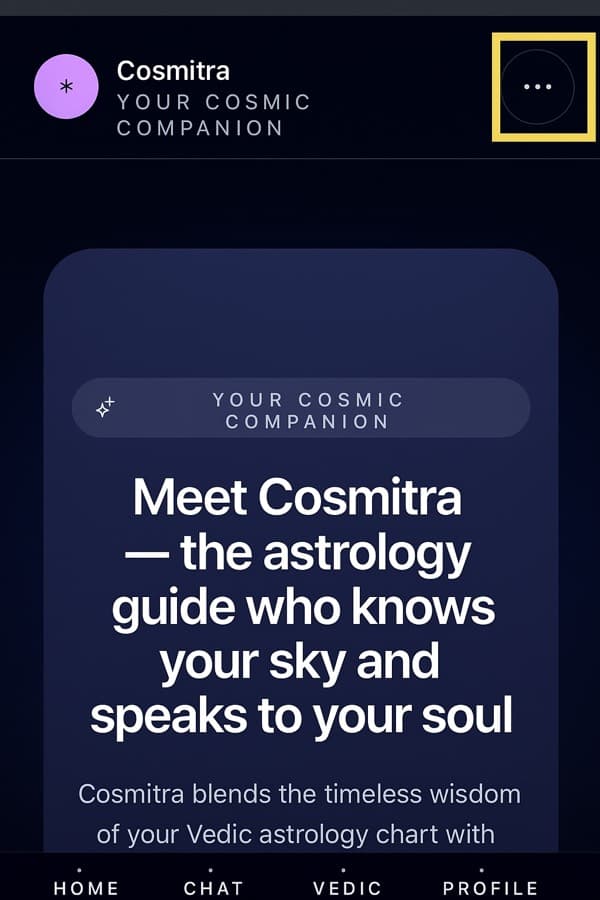
- Open Safari and visit cosmitra.com.
- Tap the Share icon (the square with an upward arrow, in the bottom or top toolbar).
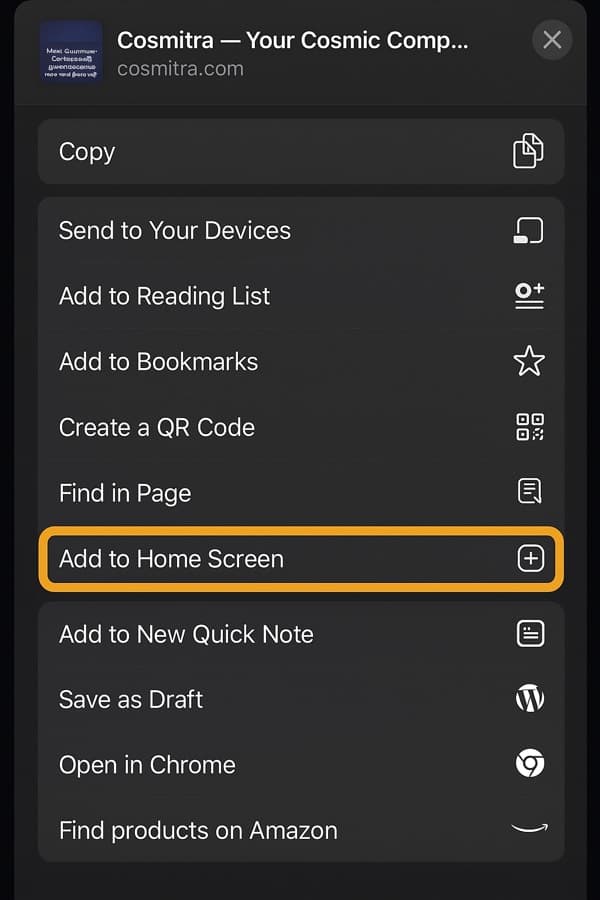
- Scroll down the share sheet and tap Add to Home Screen.
- Confirm the name (we suggest "Cosmitra") and tap Add. The icon now lives on your home screen.
How do I install Cosmitra on Android?
Use Chrome. Android lets you install directly from the browser menu, and notifications work without any extra install step.
- Open Chrome and go to cosmitra.com.
- Tap the ⋮ menu in the top-right corner.
- Choose Install app (some phones show Add to Home screen instead).
- Confirm, and tap Install. Chrome places the Cosmitra icon on your launcher.
How do I turn on notifications?
Once Cosmitra is on your home screen, notifications are a quick toggle. Open Cosmitra from the home-screen icon (not a browser tab), then follow these steps:
- Go to Settings from your account menu.
- Under Notifications, find Push notifications and switch it on. The description reads "Get your daily guidance as a notification on this device."
- Your browser will ask for permission. Tap Allow. That is it, this device is now enrolled.
iPhone note: Apple only permits web notifications for sites you have added to the home screen, and only on iOS 16.4 or later. If you open Cosmitra in a normal Safari tab, the Push notifications toggle will not appear. Add it to your home screen first (steps above), then open it from that icon and the toggle shows up. On Android in Chrome, no install is required for notifications, though installing still gives you the nicer full-screen app.
Turned it on by accident, or changed your mind? The same toggle turns push back off, and you can also block notifications from your phone or browser settings for the site.
What notifications will I get?
One thing, done well: a daily-guidance notification. It is a short read of today's sky drawn from your exact birth chart, sent during the daytime in your local timezone and at most once a day. Tapping it opens your dashboard so you can read the full guidance or ask a question.
Push is separate from email. If you already get the weekly email, notifications do not double it up, and turning one off leaves the other running. We keep the cadence gentle on purpose, no streams of pings.
When are the native apps coming?
Dedicated iOS and Android apps are on the way. Until they land, the home-screen install above gives you the same one-tap, full-screen experience, and notifications already work through it. When the store apps ship, we will post here so you can switch over if you prefer.
Frequently asked questions
Is Cosmitra available as an app I can install?
Cosmitra is a web app you can install to your home screen today. On iPhone, open cosmitra.com in Safari, tap Share, then Add to Home Screen. On Android, open it in Chrome and choose Install app. The installed shortcut opens full screen and behaves like a native app. Dedicated App Store and Play Store apps are on the way.
How do I turn on Cosmitra notifications on my iPhone?
You must add Cosmitra to your home screen first. Apple only allows web notifications for sites installed to the home screen, on iOS 16.4 or later. Once installed, open Cosmitra from the home-screen icon, go to Settings, and turn on Push notifications. Your browser then asks permission; tap Allow.
What notifications will Cosmitra send me?
One daily-guidance notification: a short read of today's sky drawn from your exact birth chart, delivered during the daytime in your local timezone, at most once a day. Tapping it opens your dashboard. You can turn push off anytime from Settings, and it is separate from email, so turning one off leaves the other on.
Does adding Cosmitra to my home screen cost anything or use much space?
No. The home-screen shortcut is free and takes almost no storage because Cosmitra runs in the browser rather than downloading a large app bundle. Your free and paid access work exactly the same whether you open Cosmitra from the home screen or from a browser tab.
Questions or feedback about the mobile experience? Email us at contact@cosmitra.com. We would love to hear how Cosmitra fits into your day.
Steps reflect Safari on iOS and Chrome on Android as of August 2026; menu labels can vary slightly by device and version. Guidance is for reflection and entertainment and is not a substitute for professional medical, legal, or financial advice.